
/prod01/channel_8/media/scu-dep/current-students/images/Coffs-harbour_student-group_20220616_33-147kb.jpg)
/prod01/channel_8/media/scu-dep/current-students/services/counselling/images/RS21533_English-College-Student_20191210_DSC_6961-117kb.jpg)
/prod01/channel_8/media/scu-dep/study/scholarships/images/STEPHANIE-PORTO-108-2-169kb.jpg)
/prod01/channel_8/media/scu-dep/study/arts-and-humanities/images/RS20958_Chin-Yung-Pang-Andy_20190309__79I5562-960X540.jpg)
/prod01/channel_8/media/scu-dep/experience/images/SCU-INTNL-STUDY-GUIDE-280422-256-72kb.jpg)
/prod01/channel_8/media/dep-site-assets/component-library/screenshots/online-1X1.jpg)
MySCU Learning
/prod01/channel_8/media/scu-dep/staff/teaching-and-learning/mastheads/MySCU-transition-2000X973.jpg)
MySCU Learning: Consistent - Connected - Accessible
Welcome to MySCU Learning, your central place for FAQs, project updates, and training to support the move to the new MySCU Learning platform (Blackboard Ultra).
MySCU Learning platform (Blackboard Ultra) provides a modern, consistent, and intuitive learning environment with easier navigation, improved accessibility, and stronger engagement. Ultra also supports mobile-friendly access, making it easier to view learning materials, check grades, and keep track of assessments across devices while on the go.
The transition will be rolled out progressively across 2026, commencing with Term 1 and Dual Term 2 units for students new to SCU. Your feedback is an important part of this journey, and we encourage you to participate to help us continue to improve and refine your learning experience.
You’ll find updates and information below, including FAQs, links to training, support, and ongoing project updates.
Benefits for Students
- Consistent layout across all units
Know exactly where to find learning materials, activities, and assessments in every unit. - Enhanced activity tracking
Provides students with the ability to track the progress within units, identifying what they have engaged with and the ability to mark elements as complete. - Simplified navigation
Allows students to get to what they need with fewer clicks.
- Grades and Feedback page
All assessment details, grades, and feedback in one place. - Accessible and Inclusive
Supports disability and inclusion needs through UDL (Universal Design for Learning) principles. - Multi-device friendly
Students will experience a seamless interaction across phones, tablets, and computers.
The New Look and Feel
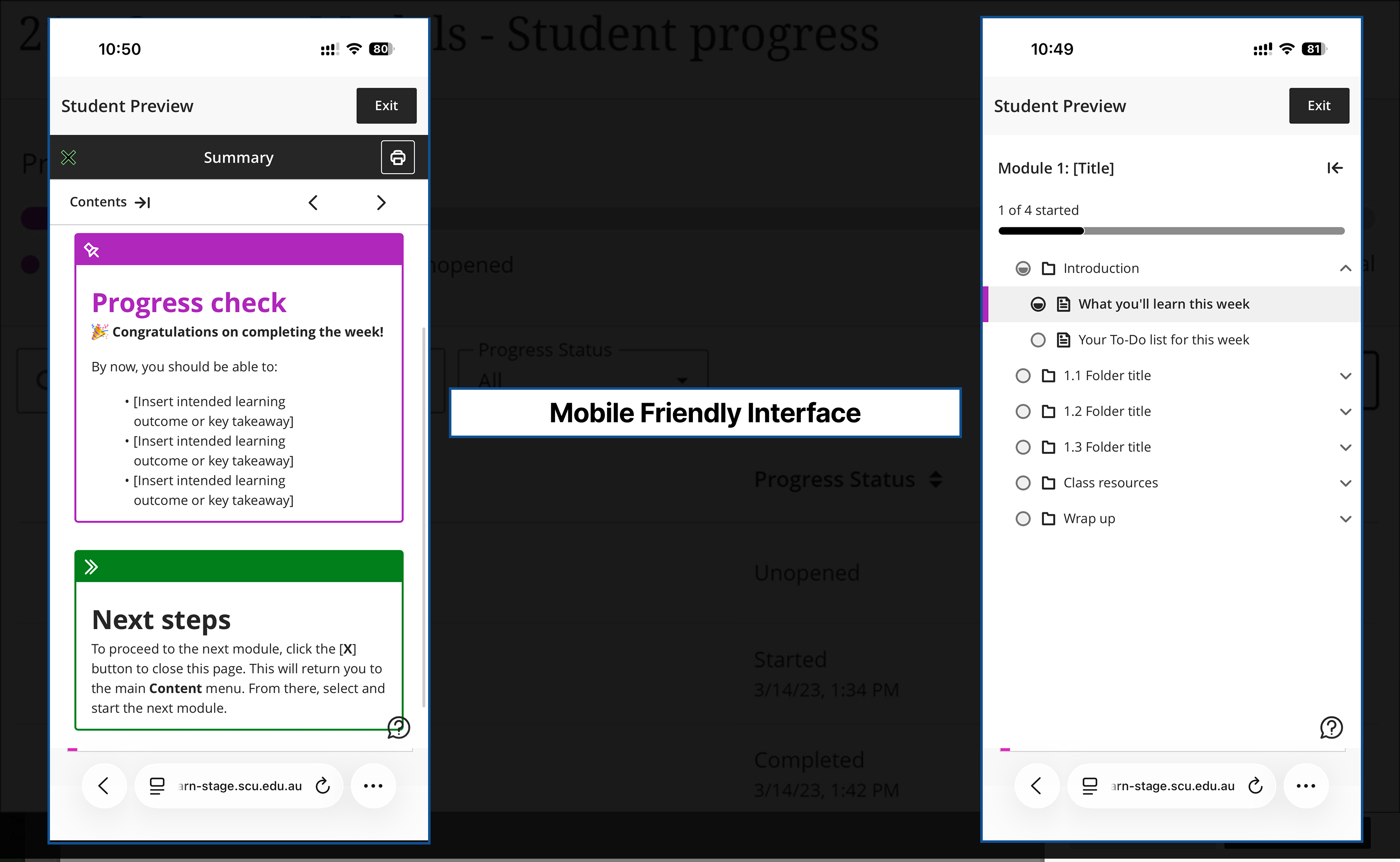
Mobile Friendly Interface screen capture
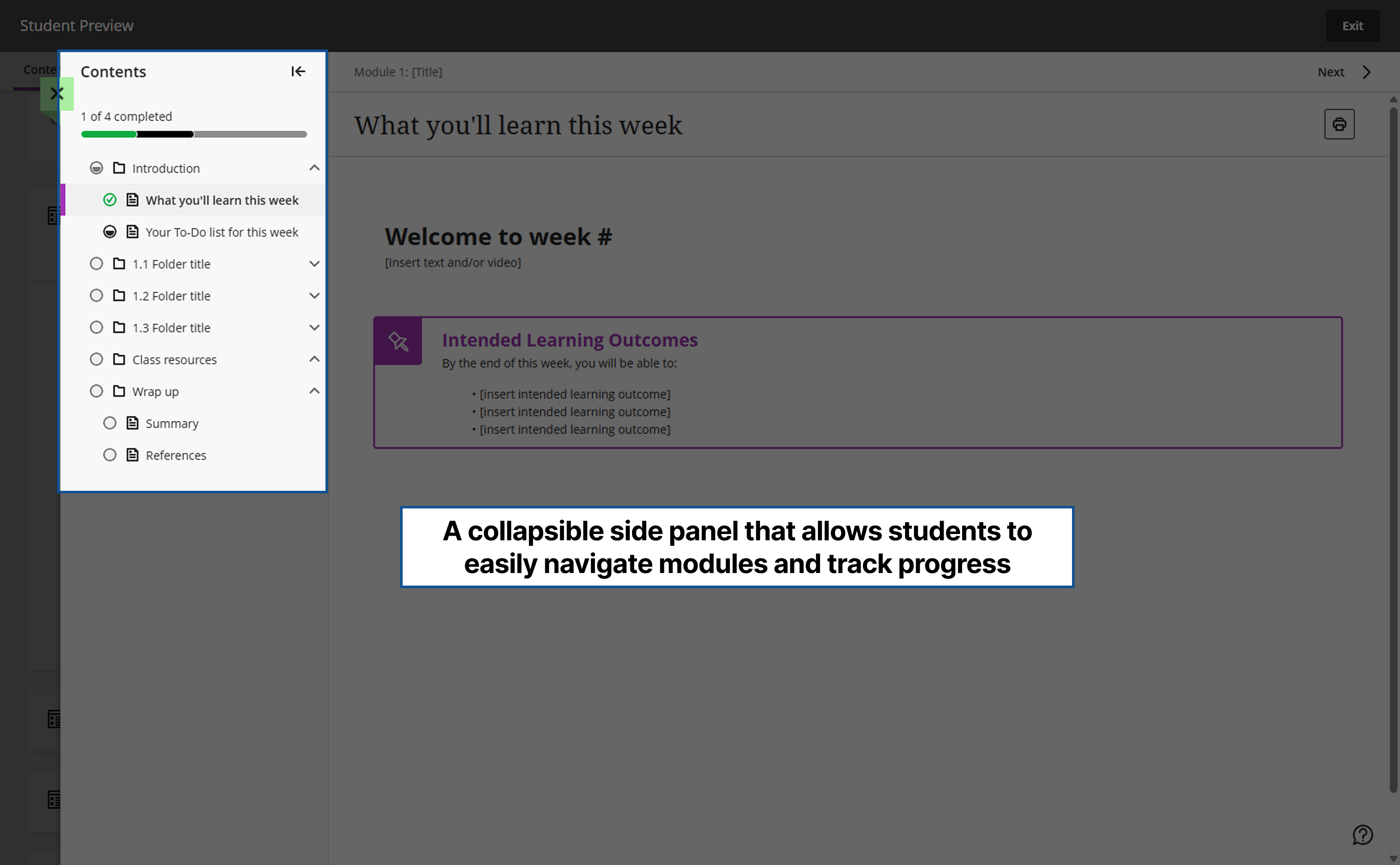
Track Progress Through Collapsible Table of Contents Navigation
How to Guides - Students
The following table provides direct links to microlearning videos and pages across SCU and the Blackboard Ultra Help Centre. The table will enable students to self-direct learning across key topics, optimising their experience. The Blackboard Ultra support site presents both descriptive and video micro-learning options. Click the link, and you will notice that both the right- and left-hand navigation are displayed depending on the page topic to help optimise your search.
| Topic | Link | Description |
|---|---|---|
|
An introduction to MySCU |
Walk through the new layout, navigation and functions of Backboard Ultra. Introduction to MySCU is also found on the landing page. |
|
|
Editing your profile |
How to update your profile, photo, notifications and personal details. |
|
|
Notifications |
Notifications |
To set how and when you would like to receive notifications, view this video and the steps. |
|
Interacting with others |
Interacting with others |
MySCU offers a wide range of tools to foster communication and engagement with students. Click the link, then use the left-hand navigation to explore more information and videos on interacting with others via announcements, messages, discussions, and conversations, and to find other users. |
|
Assessment Grades in MySCU |
Grades |
Centralised Gradebook allows you to view all assessment grades and feedback in a view. |
|
Unit Calendar |
Calendar |
A central calendar helps you manage all your units and activities in one place. How to select your view, create a list of all due dates and add events. |
|
Activity Page |
Activity Page |
Provides a central view of all Unit activities and events. |
|
Interacting with others |
Interacting with others |
MySCU offers a wide range of tools to foster communication and engagement with students. View the left-hand navigation to explore messages, discussions, announcements, groups, email, conversations and record audio and video. |
|
Mobile Browser |
Supported Browsers |
Mobile app supported browser information and troubleshooting. |
|
Language Settings |
Language Settings |
MySCU layout can be presented across a wide range of languages. |
|
Assignment Submission |
Submitting an Assessment in MySCU |
Step-by-step instructions on how to submit an assignment. Scroll to the bottom of the Backboard Ultra for Students section and select the associated link. |
|
Assessment Skills Toolkit |
Assessment Skills Toolkit |
The Assessment Skills Toolkit has been developed support your assessment journey: from understanding tasks and planning, to finding information, producing, submitting, and using feedback to improve. Each stage is presented as a module in the Toolkit. |
High-level project timeline
The MySCU Transition is being introduced in stages to ensure a smooth transition.
-
Term 1/Dual Term 2: Units for commencing student cohorts to be transitioned to Ultra, so that students starting their study in Term 1, 2026 will experience the new MySCU environment
-
Term 2: 2026: Units will continue to be released in the new MySCU with a focus on the commencing / first year cohorts, while the remaining units will also be transitioned progressively throughout the year
-
By the end of 2026: All SCU learning sites will run on Ultra, providing a consistent experience for every student.
MySCU Learning FAQ's
SCU is updating MySCU (Blackboard Ultra) during 2026, with all units moving across before Term 1, 2027. The new MySCU is simpler to use, easier to navigate, and more accessible. You can also access MySCU on your mobile, so you can keep on top of your learning wherever you are, whenever you need.
This change to MySCU is part of SCU’s focus on enhancing your learning experience. You’ll see a more consistent unit layout and clearer, higher-quality content. Plus, with better visibility and mobile access, it’ll be easier to stay on top of your studies and track your progress on the go.
Our aim is for new students starting at SCU in Term 1, 2026, to be using the new MySCU (Ultra).
We’re working to have all Term 1, 2026, units for new undergraduate and postgraduate students ready to go, with the rest of the units moving over across 2026. While this is happening, some students may use both the current MySCU and Ultra. This means you will have units with different navigation, layout, look and feel between the current MySCU and MySCU Ultra. You can also access your MySCU Ultra site on a mobile device.
Ultra has some new features you won’t find in the current MySCU, and they’re designed to make your learning experience better, like:
- Easy to use and stay organised: Clean modern look, with easy navigation, better search capability, weekly structure and progress tracking.
- Learn and connect with others: user-friendly engagement, group collaboration and different ways to connect with your classmates.
- Access for everyone, anywhere: mobile-friendly, supports disability and inclusion needs.
There’s an intro Introduction navigation video in MySCU to help you find your way around and understand the layout. We’ll also add short how-to videos and support guides to this page over time.
Ultra works on both desktop and mobile. For the smoothest experience, make sure your browser or app is up to date.
Desktop: Google Chrome, Mozilla Firefox, Microsoft Edge, Apple Safari
Mobile: Android (Chrome), Apple iOS Safari
To ensure you are ready for my unit:
- Watch the CTL - Introduction navigation video (Training Resource Links).
- Ensure your browser is updated to the most recent version.
- Bookmark the MySCU login page.
- Download the Blackboard app (Anthology Inc. Education)
a. How to Log on to the Blackboard app
The app may load slowly if your connection is poor. SCU recommends accessing your MySCU learning site in a web browser on your mobile device for a faster, more interactive experience on the go.
Remember to ensure you have the latest version of the browser installed.
SCU recommends accessing your MySCU learning site in a web browser on your mobile device for a faster, more interactive experience on the go.
Remember to ensure you have the latest version of the browser installed.
Blackboard Ultra has tools that assist students to create alternative file formats based on their accessibility needs. Students that will benefit from this software, should look for this icon  .
.
MySCU learning unit supports accessibility across structure, navigation, visual presentation, multimedia content, and assistive technology. View the Accessibility Overview for more details.
Technology Services has created support material to assist you when learning how to submit an assignment in Ultra. Within BB Ultra for Students, scroll to the bottom of the page and select the associated link.
There is an Assessment Toolkit located in your learning unit site that is designed to guide you through the assessment journey and strengthen your academic success. Click on Assessment on the navigation bar and then scroll down to Assessment Support. Click on this to access The Assessment Skills Toolkit.